
Enrollments open in
Days
Hours
Minutes
Seconds
From beginner to color grading your own looks in DaVinci Resolve in 5 weeks
Join my 5-week live DaVinci Resolve Color Grading cohort for creators who want to finally create their own looks.
Join the waitlist
Lessons: March 2 - April 4, 2026. Limited to 75 spots
Next cohort:
March 2 - April 4
in 60 days from now you’ll color grade your own cinematic looks
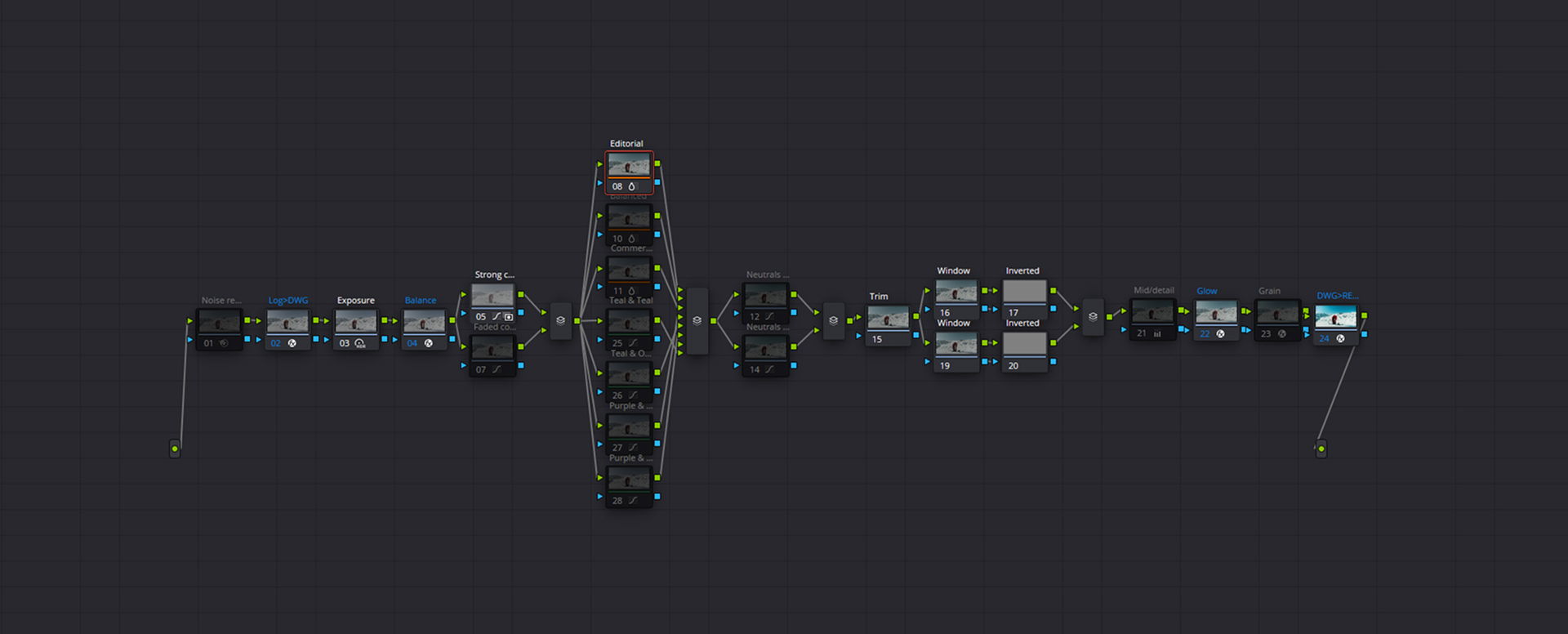
By the end of this cohort, you’ll understand and rebuild the exact modular color grading system behind my own work. This isn’t a simplified demo or a stripped-down example. It’s the full modular system, with multiple looks built in and rebuilt from scratch together. You’ll see where every node lives, why it exists, and what problem it solves. And more importantly, you’ll understand how to build it from scratch and on top of it to create your own looks. This is the system behind my grades. And this is what we’ll rebuild together.
Join the waitlist
— week 01 - 2 hours
Build the foundation that everything else depends on
We start by zooming out. You’ll get a clear overview of the modular system, what we’re building towards, and why it’s designed to grow with you. We’ll also cover the fundamentals that directly affect how far you can push your grades and how versatile your looks can be.
Live lesson date: Between March 2 - March 8
The modular system overview
Node tree fundamentals and scalability
Core color theory concepts
Camera limitations and trade-offs
Live Q&A Session
— week 02 - 2 hours
Understand every node and take control of your workflow
This week is about removing guesswork. We’ll break down the entire node tree and explain what each node does, where it belongs, and why it exists. You’ll see multiple ways to approach the same problem and learn which techniques are safe, which ones are risky, and which ones to avoid.
Live lesson date: Between March 9 - March 15
Node order and signal flow
Every node explained
Multiple techniques per node
Common mistakes and bad habits
Live Q&A Session
— week 03 - 2 hours
Shape mood, style, and character in your grades
Now we shift fully into the creative side of color grading. This chapter focuses on how looks are formed and how mood is created. You’ll learn how to push and pull your image with intention, how different tools influence the feel of a shot, and how subtle changes can completely transform the result.
Live lesson date: Between March 16 - March 22
Creating mood and visual identity
Controlling color direction and intensity
Adding depth, character, and texture
Live Q&A Session

— week 04 - 2 hours
Build complete looks with confidence
This is where everything clicks. Using the system, theory, and techniques from the previous weeks, we’ll start building full looks from scratch. You’ll learn how to translate an idea or reference into a working grade and how to create multiple looks within the same modular structure.
Live lesson date: Between March 23 - March 29
Building multiple looks step by step
Translating mood into a grade
Creating variations within one system
Refining and balancing your looks
Live Q&A Session
— week 05 - 2 hours
Stress-test, refine, and lock in your looks
In the final week, we make sure your work actually holds up. We’ll test your looks across different footage, fix edge cases, and refine the system so it’s reliable in real-world scenarios. From there, we’ll turn everything into reusable assets you can keep using.
Live lesson date: Between March 30 - April 4
Testing looks across different footage
Refining for consistency and flexibility
Solving problem cases
Saving and packaging your looks
Live Q&A Session
Next cohort:
March 2 - April 4
As a solo creator there’s already a lot to figure out
Camera settings
Video editing
Lights
Sound design
Audio levels
Composition
Scripts
Microphones

And then there’s color grading
It should be the fun part. Instead, it often turns into the most frustrating one. Nodes, Color spaces, Curves, Split toning, Subtractive saturation. A hundred tools, all doing different or slightly different things. So you go down the YouTube rabbit hole. One tutorial fixes one problem, but creates two new ones. Months pass, and you still don’t feel in control of your own footage. We’re here to change that.
Join the waitlist
This program is for you if you’re ready to level up
You have a clear vision of how your footage should look, but you can’t consistently get there.
You’re tired of the YouTube rabbit hole, where tutorials solve isolated problems but never the full picture.
You feel stuck despite knowing the basics of DaVinci Resolve, and every grade feels fragile.
You work on projects that need different looks, but you don’t have a reliable workflow you can reuse.
You already use DaVinci Resolve, or you’re switching from Premiere Pro or Final Cut Pro, and want to do it properly.
You’ve tried LUTs, but they never quite give you the look you’re after.
This program is not for you if
You’re looking for one-click looks that magically work on every clip, without understanding or adjusting anything.
You don’t want to think about color at all, and just want something that “kind of works.”
You’re not using DaVinci Resolve, or you’re not willing to commit to learning it.
You’re part of a studio or production house with internal training pipelines, mentors, or established grading workflows.
You want someone to give you a look and move on, instead of learning how that look is built and how to evolve it.
Next cohort:
March 2 - April 4
What others are saying
This is the first time I’m running this live cohort, so no cohort reviews yet. That said, thousands of creators already use my LUTs, presets, and courses. I regularly get messages asking for 1-on-1 coaching, feedback on grades, or help understanding color. I’ve worked with brands like ASUS and Insta360 and I’m a LUMIX ambassador.
If you’ve followed my work, you already know what to expect. This cohort is simply the deepest version of that.
Join the waitlist


Trusted by 3500+ creators
I have no knowledge when it comes to colour grading and video LUTs but I am so thankful to stumble upon the preset so all I have to do is pick the right preset in Lightroom or recording Log with LUT preview. Freaking amazing.
Eddy A.
This course and luts package is amazing. Everything is so clearly explained in terms of the video editing. And the LUTS are gorgeous!
Arnaud D.
Amateur videographer coming from the world of audio - genuinely appreciate all the hidden gold nuggets spread throughout Amar’s course. The content is already EXTREMELY high quality, but the thing that constantly brings me back to his page is how, you’ll be watching for 30 seconds, and rewind 17x to catch 6 small tips that he doesn’t even appear to know he’s dropping!
Jonathan R.
Amazing gateway to the world of pro cinematic grading, combining tips and tricks with useful assets for daily use.
Pawel B.
Greetings from IRAQ I've watched many videos about the DaVinci Resolve, and it's was the best huge informations that i ever had about video editing & color grading. thanks a lot
Isam K.
The LUT pack is fantastic, and the included instructions are clear, concise, and easy to follow even for someone new to color grading. The guidance made it simple to get professional-looking results quickly. The colors are vibrant yet natural, and they’ve completely elevated the look of my videos. Highly recommended for anyone wanting to take their editing to the next level.
SajaP
Fantastic looking LUTS and a throughough course that goes along with it! We'll worth the investment. Explanations for use were clear and helpful.
Brodie G.
This course is outstanding! It provides a clear and structured path for beginners, cutting through the overwhelming flood of information. The instructions are excellent, and the included LUTs are stunning and professional, exactly what I needed to elevate my work. Highly recommended!
Daniel R.
I came into the course with some experience in color correction, but this truly felt like a masterclass. My skills have noticeably improved, especially my attention to detail when it comes to shadows, highlights, and overall tone. Since completing the course, I’ve shot new footage and can already see a significant difference in the quality of my color grading. It’s had a real impact on my work. Highly recommend this course to anyone serious about leveling up their color correction game.
Sebastian A.
Love the powergrade option, showing all the steps with explanation in PDF. It really unlock my mind to a lot of possibilities, in the way of I never thought of, thanks for detailed insight, love from Asia
Wei Y.
The LUTs themselves are perfect for my needs. The included “commercial” set has the types of tones and contrast that make even simple D-Log drone footage shot for a very conservative client look polished and expensive, not gimmicky and overly vibrant. They don’t scream “i color graded this!”. I’m excited to try the other grades on more adventurous upcoming projects in other formats. My favorite part is the documentation — Amar provides two different workflow examples and lays out exactly how to get solid, repeatable results. I’m a still photography mainly, so this level of instruction for video editing is added value I appreciate. I have no problem recommending this collection to anyone with demanding, picky commercial clients.
Andrew M.
I debated on purchasing the course for a while now. I knew I had an idea on how to edit this kind of content and I did, but Amar really brakes it down to digestible videos to walk you through step by step
Preston U.
Next cohort:
March 2 - April 4
Tools, Not Dogma
There are wrong ways to do things. And there are multiple correct ones. For every major decision in the node tree, we’ll look at different approaches: You’ll see what happens when tools are used in the wrong context. And why some techniques break your image even though they’re popular on YouTube. You’ll also unlearn bad habits along the way. The goal isn’t to memorize tools. It’s to know which tool to pick to achieve a specific look.
Join the waitlist
Next cohort:
March 2 - April 4
Your investment
This is an investment in finally understanding color grading instead of guessing your way through it. Over five live sessions, you’ll build a modular system, develop your own looks, and do so in a live, group coaching environment supported by a private Circle community.
Trusted by 3500+ creators
€499
€599 if you're not on the waitlist
Limited to 75 creators
From beginner to developing your own looks
5 weeks of live color grading cohort
One live session per week, 2 hours per session
30 minutes Q&A after each session
Access to the private Circle community
Cinematic PowerGrade
Cinematic LUT Collection
Lifetime access to all session replays
Waitlist bonuses
€100 discount
One-on-one 1-hour session with Amar
Early access before public cart


In case you missed anything
Yes, beginners can absolutely join.
If you’ve opened any editing software before, edited some videos, and have a basic understanding of how editing works, you’re more than fine. You don’t need to be advanced, and you definitely don’t need prior color grading experience.
If you’ve never edited a video before at all, then color grading probably isn’t the first thing you should focus on yet. In that case, it makes more sense to first get comfortable with basic editing and storytelling, and come back to color grading once that foundation is in place.
This cohort is built for creators who have already taken a few steps, tried to learn color grading, and realized they’re stuck. If that sounds like you, you’re in the right place.
Yes, this cohort is fully focused on DaVinci Resolve.
DaVinci Resolve is by far the most complete tool for color grading compared to other major editors like Premiere Pro and Final Cut Pro.
While this is the first time I’m running this live cohort, I often get asked via DM about one on one coaching by people who are looking to switch to DaVinci Resolve and want to understand color grading properly.
This cohort is a more structured and scalable way of teaching exactly that.
If you’re already using Resolve, great. If you’re planning to switch, this is a very solid way to do it.
Yes, you’ll get full replays of every session.
All participants will also be invited to a private Circle community, where you’ll have access to the session recordings, supporting materials, and ongoing discussions.
Live attendance is encouraged because that’s where you can ask questions in real time and learn from others. But if you miss a session due to time zones, work, or life, you won’t miss out on the content.
No, and it’s intentionally different from my pre-recorded courses.
I do offer courses in other areas, and those are great for structured, on-demand learning. This cohort is something else entirely. It’s the most up to date and deepest way to learn color grading that I offer.
The difference isn’t just what is taught, but how it’s taught. Because this is live, you’re not only learning why things work, but you’re also able to ask questions as they come up, get clarification when something doesn’t click, share your work and get feedback, and learn from the questions and mistakes of others.
Combined with the private Circle community, this comes much closer to personal coaching than to a traditional course. You’re not learning in isolation. You’re learning with guidance, context, and interaction.
The free version of DaVinci Resolve is more than enough to follow along with this cohort.
Most of the grading concepts, workflows, and techniques we cover work perfectly in the free version. You will not be blocked or left behind if you are not using Resolve Studio.
There are a few advanced features in Studio, like certain noise reduction tools, but those are not essential to understanding how color grading works or to building your own looks.
If you do have Studio, great. If not, you're still good to go.
No, you don’t.
Color grading fundamentals are not tied to a specific camera or brand. You’ll receive practice footage to work with, and you’re also encouraged to use your own material if you want.
Whether you shoot on Sony, Canon, Panasonic, Blackmagic, or even a smartphone, the same principles apply. What changes is how far you push certain tools, not the way you think about color grading.
This cohort is about understanding decisions, not optimizing for one specific camera.
Each live session is about two hours long.
On top of that, you can expect to spend some additional time practicing and applying what you learned. How much time that is depends on you. Some people move faster, others take things more slowly, and both are fine.
The cohort is designed to fit into a busy schedule. You don’t need to grind for hours every day. Consistent, focused practice is far more valuable than trying to do everything at once.
Because you’ll have access to replays, you can always revisit sessions and move at a pace that works for you.
That’s actually very common.
Most people don’t struggle because they didn’t try hard enough. They struggle because they learned fragmented advice, copied looks without understanding them, or picked up bad habits along the way.
This cohort is built around understanding how looks are constructed and how tools behave in different situations. Instead of following someone else’s template, you’ll learn how to make decisions based on intention and context.
If other programs didn’t click for you, this is likely filling in the missing piece rather than repeating the same information.
Yes. That is one of the main goals.
We’ll build looks together so you understand the structure behind them. From there, you can use those looks as they are, fine tune them, or create completely new ones using the same system and techniques.
The goal is not to copy my look. The goal is to give you enough understanding and control to develop a look that fits your own work and evolves over time.
By the end of the cohort, you’ll have a modular grading system that you understand and can keep using.
You’ll also retain access to the session replays, the materials, and the Circle community. This is not something that disappears after the last live call. It’s meant to be a foundation you can continue building on.
Not really.
This cohort is built primarily for solo creators and freelancers who grade their own work and don’t have internal training pipelines or mentors.
If you’re part of a studio with established workflows and internal education, this may overlap with things you already have access to.
This is for people who have to figure things out themselves and want a reliable system they can depend on.
That’s okay.
You’re not expected to be perfect or keep up at all costs. Life happens. Work happens. The recordings are there so you can catch up when you need to.
The cohort is designed to support progress, not pressure. As long as you stay engaged and keep applying what you learn, you’ll get value out of it.
If you do get stuck, you can ask questions in the Private Circle Community.
Fennec V2.Y25.1
$499
$399
Shop now