Tested on thousands of clips across many different cameras
Compatible software

DaVinci Resolve
iPad & Desktop

CapCut
Desktop

VN Editor
Mobile & Desktop

Adobe Premiere
Desktop

Final Cut Pro
Desktop
Compatible cameras
Models
iPhone (all models)
Supported footage
- Standard camera video (default camera app)
- HDR video
- Log video (Apple Log)
How it works
Most smartphone footage is already Rec.709, which means:
- You can apply the LUT directly
- No extra setup needed
If you recorded in Log:
- Convert Log → Rec.709 first
- Then apply the LUT
Both workflows are fully supported.
What is Rec.709?
Rec.709 is the standard video look used everywhere. Phones, TVs, YouTube, Instagram and most apps expect Rec.709 by default.
If your video:
- Looks normal
- Isn’t flat or grey
- Comes straight from your phone’s camera app
Then it’s already Rec.709.
Models
a1, a9, a7 series, a6xxx series, FX series (FX3, FX6, FX9, FX30), RX series, Venice
Recording formats
X-OCN (RAW), ProRes RAW, ProRes, XAVC
Color profiles
S-Log2, S-Log3, S-Cinetone, Cine1–4, Rec.709, HLG (HLG1–3)
Models
EOS R series, Cinema EOS (C70, C200, C300, C400, C500, C700)
Recording formats
Canon RAW, ProRes RAW, ProRes, XF-AVC, H.264, H.265
Color profiles
C-Log, C-Log2, C-Log3, Wide DR, Rec.709, Canon Cinema Gamut
Models
S series (S1, S1H, S5, S5II, S5IIX), GH series (GH4, GH5, GH5S, GH6), G series, BGH1, BS1H
Recording formats
BRAW, ProRes, H.264, H.265
Color profiles
V-Log, Rec.709
Models
X series (X-T, X-H, X-S, X-Pro, X-E), GFX series
Recording formats
ProRes RAW, ProRes, H.264, H.265
Color profiles
F-Log, F-Log2, Rec.709
Models
Z series (Z6, Z7, Z8, Z9, Zf, Z30, Z50)
Recording formats
ProRes RAW, ProRes, H.264, H.265
Color profiles
N-Log, Rec.709
Models
Pocket Cinema Camera 4K / 6K / 6K Pro / 6K G2, URSA Mini, URSA Broadcast, Studio cameras
Recording formats
BRAW (Blackmagic RAW), ProRes, H.264, H.265
Color profiles
Blackmagic Film Gen 4, Blackmagic Film Gen 5, Video, Extended Video, Rec.709
Models
DSMC2 series, KOMODO, V-RAPTOR
Recording formats
REDCODE RAW (R3D), ProRes
Color profiles
RED LogFilm, Log3G10, Log3G12, REDWideGamutRGB, Rec.709
Models
Mavic series, Air series, Mini series, Inspire series, FPV, Ronin cameras
Recording formats
ProRes RAW (supported models), ProRes, H.264, H.265
Color profiles
D-Log, D-Log M, D-Cinelike, Rec.709
Models
Alexa Classic, Alexa Mini, Mini LF, Alexa LF, Alexa 35, Amira
Recording formats
ARRIRAW, ProRes
Color profiles
LogC, LogC3, LogC4, ARRI Wide Gamut, Rec.709
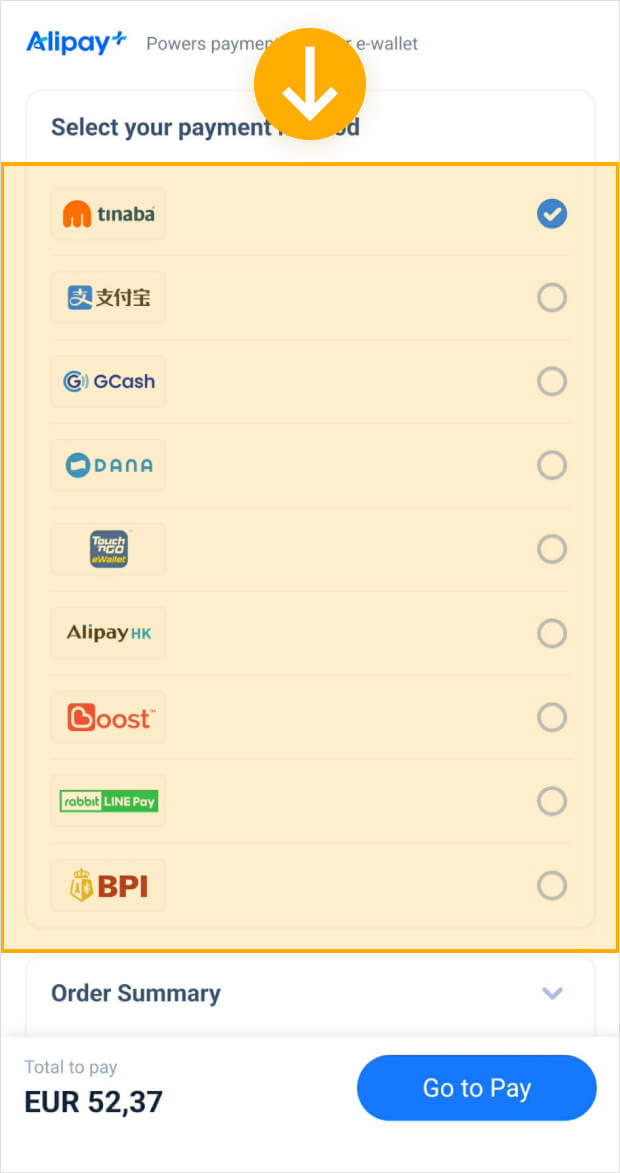
How to pay using GCash
From any page, simply add the item to your cart.

Once the item is in your cart, you will be redirected to the cart page. From there, click Go to Checkout.
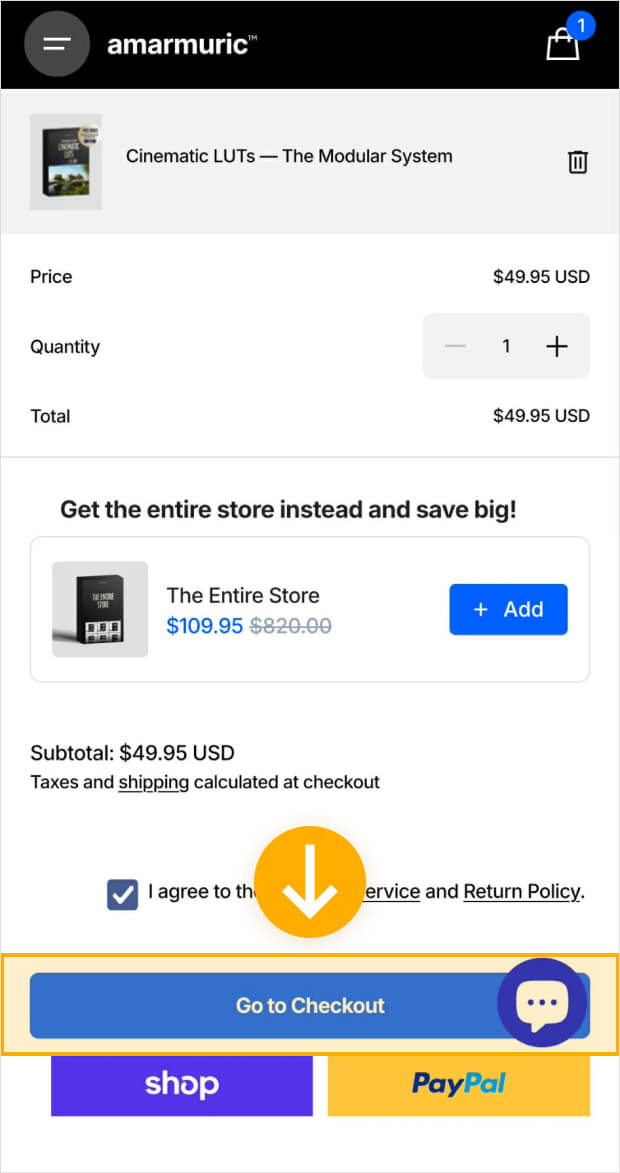
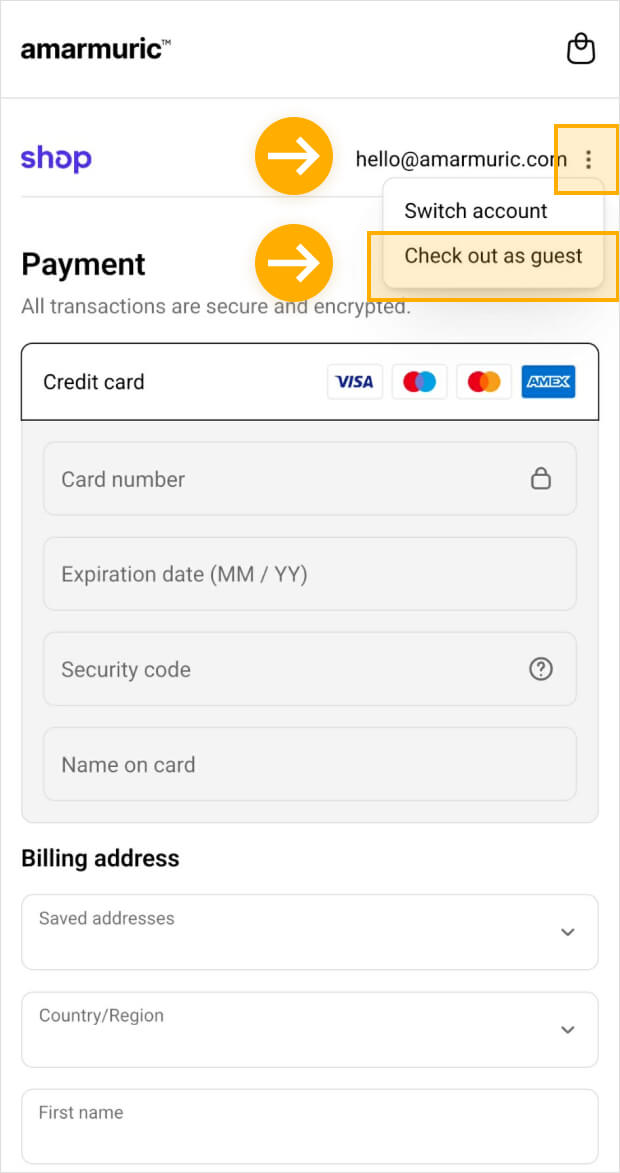
If you are already logged in to Shop, please log out. Otherwise, you can skip this step.
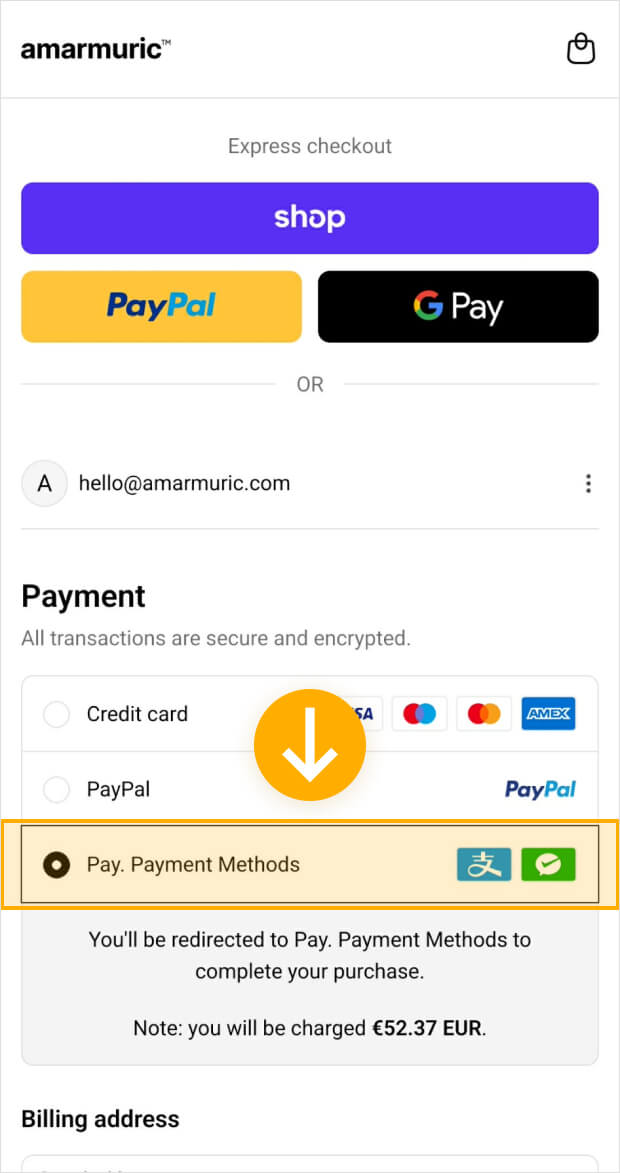
Select "Pay. Payment Methods".
Select "Alipay Plus" from the overview.
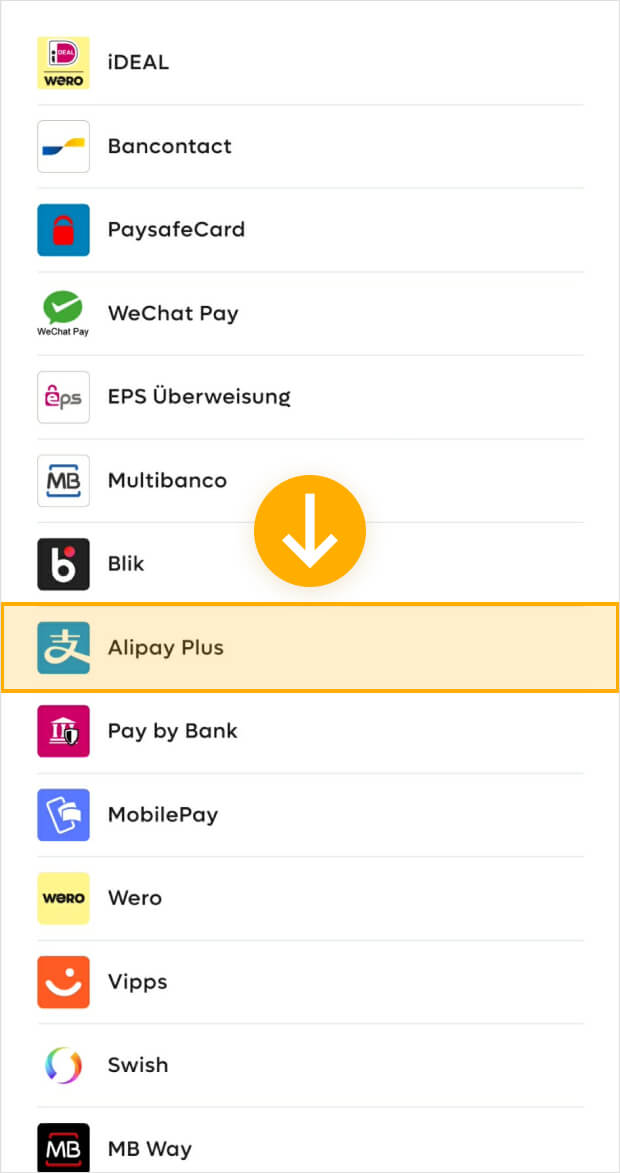
Select your favorite Asian payment method and click on "Go to Pay". That's it.
All cameras - RAW, Log and Rec.709
RAW, Log and Rec.709
You can record in RAW, Log or Rec.709
Beginner tip: RAW and Log footage looks flat or grey and Rec.709 looks 'normal'.
Our LUTs are designed to work with any camera and any recording format. Whether you shoot RAW, Log, or Rec.709, there’s a simple workflow that fits your setup. What matters is how your footage is prepared before applying the creative LUT.
— Workflow 01
If you record in RAW or Log
In the final week, we make sure your work actually holds up. We’ll test your looks across different footage, fix edge cases, and refine the system so it’s reliable in real-world scenarios. From there, we’ll turn everything into reusable assets you can keep using.
Beginner tip: RAW and Log footage looks flat or grey.
1
Record in RAW or Log
2
Convert RAW / Log to Rec.709
3
Apply our Creative LUT
Complete instructions in the guide

— Workflow 02
If you record in Rec.709
In the final week, we make sure your work actually holds up. We’ll test your looks across different footage, fix edge cases, and refine the system so it’s reliable in real-world scenarios. From there, we’ll turn everything into reusable assets you can keep using.
Beginner tip: Your footage already looks 'normal' in Rec.709.
1
Record in Rec.709
2
Apply our Creative LUT
Complete instructions in the guide
One Cinematic DNA
RAW, Log and Rec.709
Cinematic Collection — The Modular System
Beginner tip: RAW and Log footage looks flat or grey and Rec.709 looks 'normal'.

Beginner tip: RAW and Log footage looks flat or grey and Rec.709 looks 'normal'.
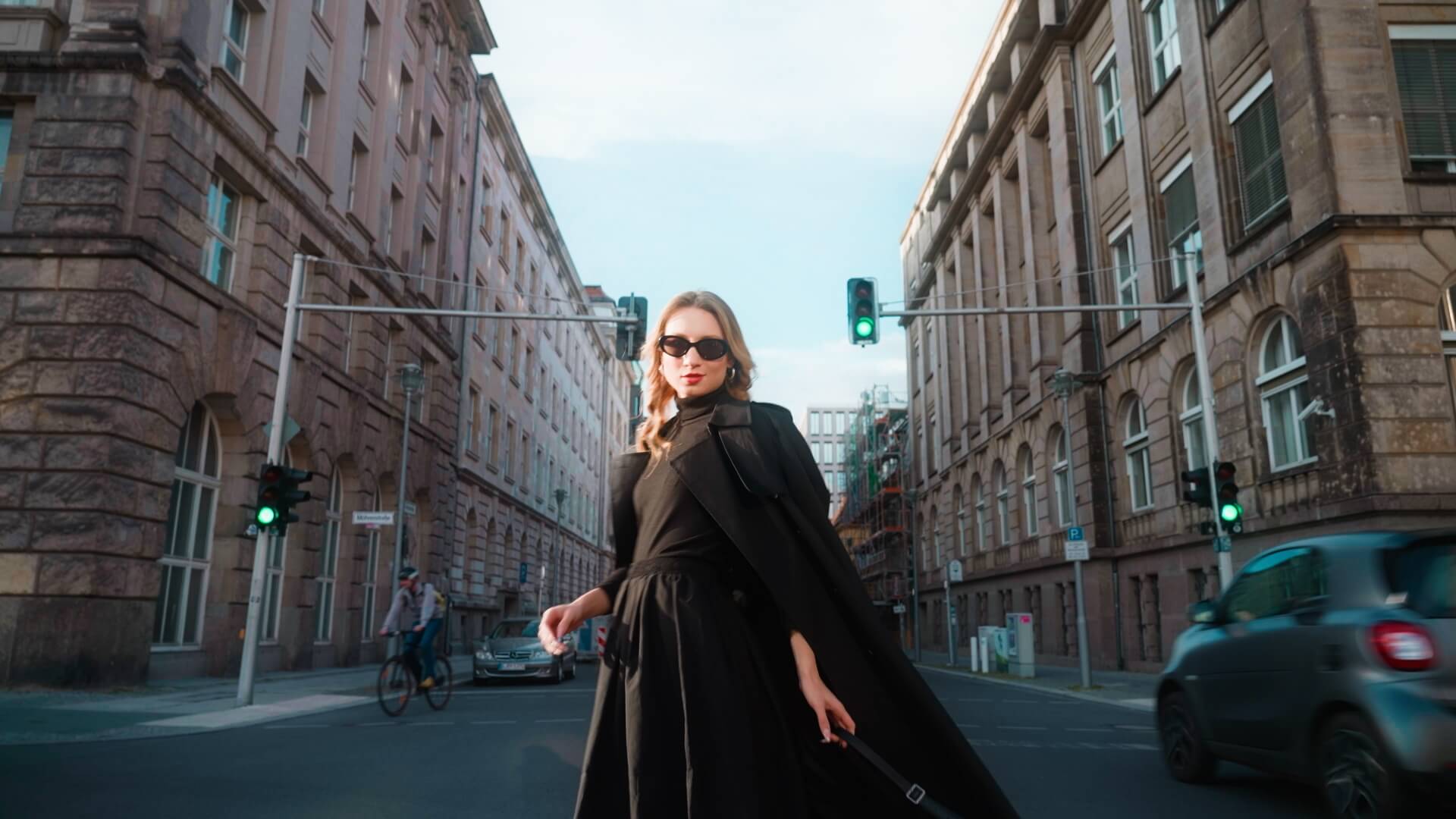
The Cinematic Collection isn’t a pack of 30 unrelated looks. It’s one carefully engineered cinematic foundation, exported in 30 modular configurations.
Every LUT carries the same core DNA: rich and deep colors, cyan blues, warm-toned greens, natural skin tones across all complexions, and refined split toning. The difference isn’t the style, it’s the configuration.
Need softer, faded filmic contrast instead of bold contrast? It’s there. Want cleaner shadows without split toning? Choose the clean variant. Shooting fashion where color accuracy matters more than heavy shifts? Pick the Commercial color intensity instead of Editorial.
You’re not searching for a LUT that “works.” They all work.
You’re choosing how strong the contrast feels, how intense the color shifts are, and how the look supports the story.
One visual identity.
Total control over how it’s expressed.
Rinse and repeat
RAW, Log and Rec.709
Built to hold up in the real world
Beginner tip: RAW and Log footage looks flat or grey and Rec.709 looks 'normal'.
The Cinematic Collection started with a clear vision for the look. While developing the LUTs, I continuously tested and refined them on real footage across different cameras, lighting conditions, and scenes. After thousands of real-world tests, these LUTs are built to hold up in any situation.
Beginner tip: RAW and Log footage looks flat or grey and Rec.709 looks 'normal'.
Our LUTs are designed to work with any camera and any recording format. Whether you shoot RAW, Log, or Rec.709, there’s a simple workflow that fits your setup. What matters is how your footage is prepared before applying the creative LUT.
Tested on thousands of real-world clips
Tested across major camera brands and color profiles
Tested in a wide range of lighting conditions
Built to hold up in any situation


Enrollments open in
Days
Hours
Minutes
Seconds
Live Color Grading Masterclass
10-hours live lessons
From beginner to color grading your own looks in DaVinci Resolve in 5 weeks
Join my 5-week live DaVinci Resolve Color Grading cohort for creators who want to finally create their own looks.
Read more